Inside the cabinet · Operator dashboard

Mission Control. The seat behind the cabinet.

The instant your cabinet activates, you land here. A daily briefing from your Chief of Staff, a queue of CEO-level missions, a credit ledger that asks before it spends, and a board of specialist AI advisors — one per department — that already know your business. The work itself is handled by an always-on AI staff that runs around the clock.

Mission Control · Home Daily briefing · Health 78
Mission Control home for the AdVault cabinet. The header reads 'Checkout Paid. Mission Control is active.' A Daily briefing from the Chief of Staff sits beside a Launch state panel showing 'In Demand', a 'Building' app status, an Availability Checked domain, two customers, and a Business Health score of 78.
Daily briefing

Your Chief of Staff opens the day for you.

Every morning the Chief of Staff reads the state of the business — build progress, advisor proposals, treasury movement, customer signals — and writes a one-screen brief. Recommendations come with reasoning. You decide what gets approved.

Step 01 · Briefing

Read what changed

What advanced overnight, what stalled, what is waiting on you. Written in plain business language — no tickets, no CI logs.

Step 02 · Recommendation

Pick the next mission

The Chief of Staff names the move that matters most today and explains the tradeoff. The advisor board can argue with it.

Step 03 · Approve

Spend on your terms

Every credit-spending action is quoted before it ships. Approve and the AI staff goes to work; decline and nothing is reserved.
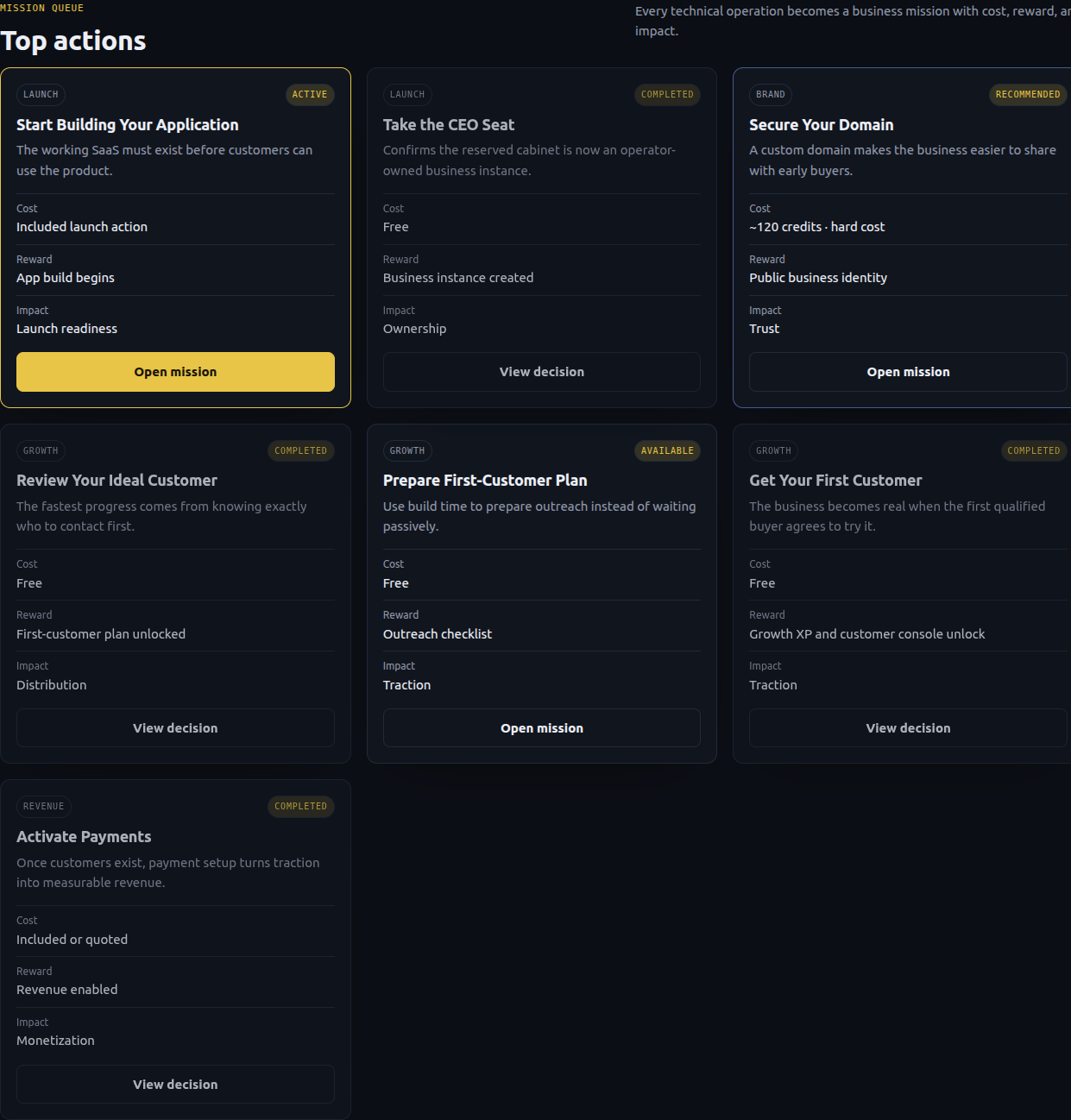
Mission queue · Top actions 7 missions surfaced
The Top actions panel in Mission Control. Mission cards include Start Building Your Application, Take the CEO Seat, Secure Your Domain, Review Your Ideal Customer, Prepare First-Customer Plan, Get Your First Customer, and Activate Payments. Each card shows cost, reward, and an Open mission button.
Mission queue

Every CEO move is a mission.

Build the application. Confirm the brand. Secure the domain. Review the ICP. Run a first-customer outreach push. Each mission has a cost, a reward, and a clear acceptance check. The queue rewrites itself as the business state changes.

  • Launch missions — get the cabinet open and the app live.
  • Growth missions — first customer, outreach, referrals, pricing tests.
  • Trust missions — testimonials, FAQ, copy, landing-page polish.
  • Infra missions — scale packs and incident response when traffic spikes.
  • Event missions — time-limited challenges with bonus rewards.
Your business comes staffed

An AI staff that does the work. A board of experts that briefs you.

Both layers are AI. The staff layer is a set of always-on agents that ship the work — features, domains, outreach, support. The advisor layer is a set of specialist agents tuned to one department each (Engineering, Growth, FinOps, Customer Voice, Product, UX, SRE, Security, Legal, Marketplace) — they read your live metrics, draft proposals, and disagree when it matters. Advice is free. Execution spends credits only after you approve.

Always-on AI staff · execution

The team that does the work

These agents pick up approved missions and run them end to end — through PermaShip pipelines for code, through registrars for domains, through your stack for support and outreach.

  • Engineering teamPlans, builds, tests, and deploys product changes through governed PermaShip tickets.
  • Brand & Domain DeskNames, taglines, logos, copy refreshes, domain search, DNS, SSL.
  • Outreach & Sales agentsFirst-customer scripts, lead lists, cold outreach, follow-ups.
  • Support & QA agentsDrafts replies, surfaces failed signups, catches broken flows before customers do.
  • SRE & auto-healingWatches uptime and error rates, scales capacity, opens incident missions when needed.

World-class advisor board · guidance

The experts who brief you

Each advisor is a specialist agent tuned to one department of a software business. They read your dashboard, propose moves, and flag risks. They will disagree with each other — that's the point.
  • Chief of StaffSynthesizes the board into one daily recommendation. The voice you hear first.
  • Engineering AdvisorEstimates feature cost, complexity, and risk before you approve.
  • Growth AdvisorAcquisition channels, outreach experiments, what to test next.
  • FinOps AdvisorMargins, hard-cost guardrails, when not to spend.
  • Customer Voice AdvisorTurns support tickets and behavior into product priorities.
  • Product, UX, SRE, Security, Legal, MarketplaceSpecialists that unlock as the business matures and the questions get more specific.
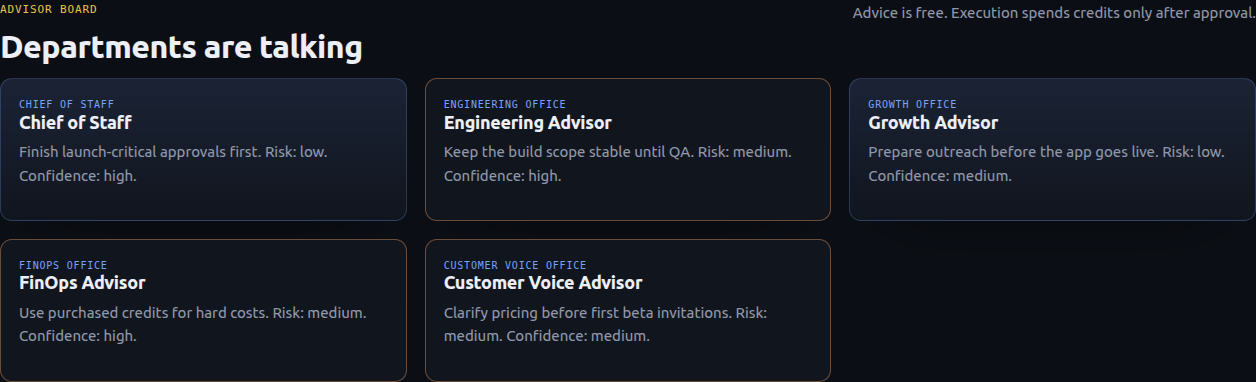
Advisor board · Departments are talking Advice is free · Execution spends credits only after approval
The Advisor Board panel showing five advisor cards: Chief of Staff (finish launch-critical approvals first, low risk, high confidence), Engineering Advisor (keep build scope stable until QA, medium risk, high confidence), Growth Advisor (prepare outreach before app goes live, low risk, medium confidence), FinOps Advisor (use purchased credits for hard costs, medium risk, high confidence), and Customer Voice Advisor (clarify pricing before first beta invitations, medium risk, medium confidence).
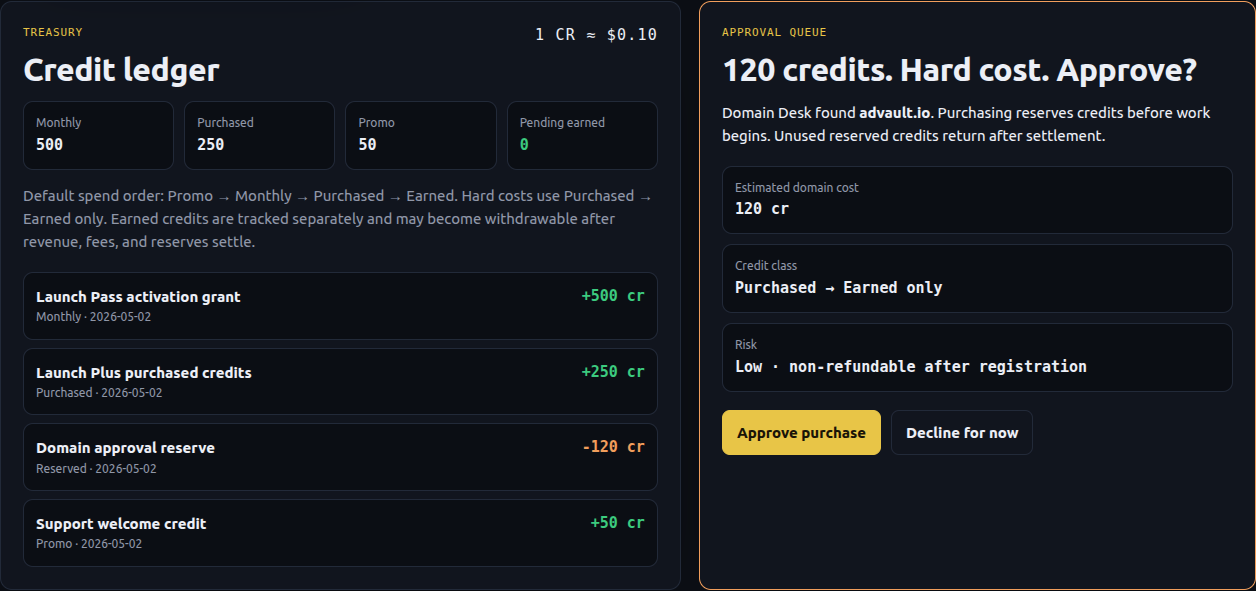
Treasury · Credit ledger & approval 1 cr ≈ $0.10
Two treasury panels. Left: Credit ledger showing 500 monthly, 250 purchased, 50 promo, 0 pending earned credits, plus a transaction list including a Launch Pass activation grant and a Domain approval reserve. Right: an approval card titled '120 credits. Hard cost. Approve?' for the advault.io domain, with credit class Purchased to Earned, low risk, and Approve / Decline buttons.
Treasury · Credit wallet

Nothing spends until you approve it.

The treasury separates monthly credits, purchased credits, promo grants, and earned credits as distinct lines — because only earned credits can become cash. Hard-cost actions like a domain registration show the exact credit cost, the credit class they draw from, and the risk before you tap approve.
  • Quoted, then reserved — credits hold against the work, never disappear silently.
  • Settle under budget — unused credits return to the ledger.
  • Hard-cost guardrails — domains and infrastructure can't be paid from monthly promo credits.
  • Withdrawable line — earned credits cash out at month-end via Stripe Connect.
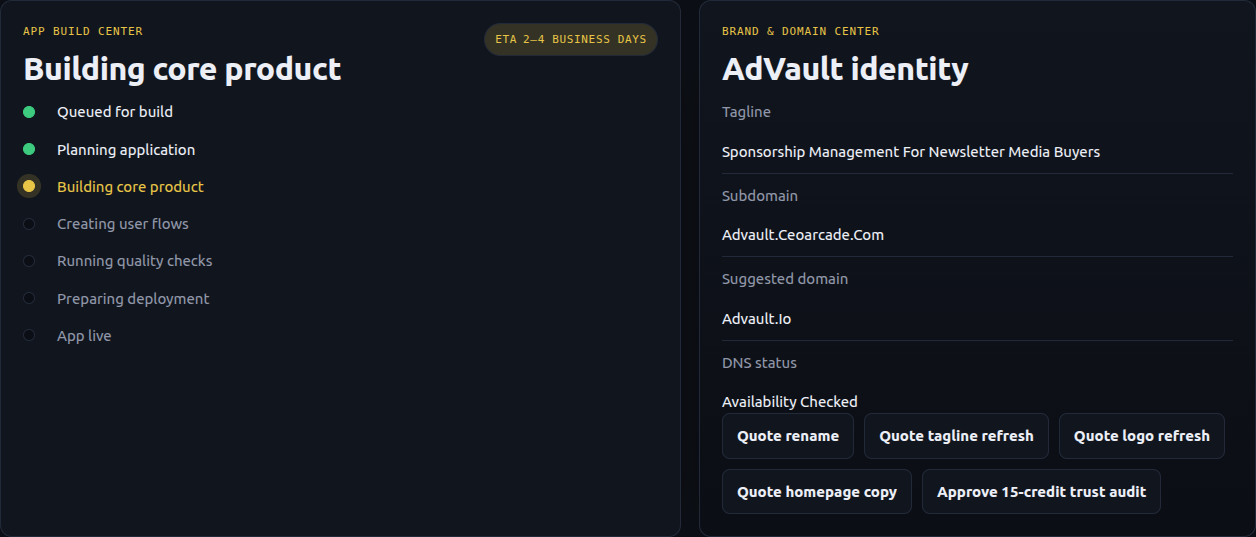
App Build Center & Brand Desk Building in the background
Two launch panels. Left: App Build Center showing the build pipeline — Queued, Planning, Building core product (active), Creating user flows, Quality checks, Deployment, App live — building in the background while you operate. Right: AdVault identity panel with tagline, subdomain advault.ceoarcade.com, suggested domain advault.io, DNS status Availability Checked, and quote buttons for rename, tagline refresh, logo refresh, homepage copy, and a 15-credit trust audit.
Launch in motion

The cabinet builds itself while you steer it.

The App Build Center translates the underlying engineering pipeline into seven plain-language stages, with a real readiness window. The Brand & Domain Desk holds your name, tagline, logo, subdomain, and the next custom domain — every change is a quote you can approve at a glance.

  • Build stages in plain English — no CI logs, no ticket IDs.
  • Quote a rename, tagline, logo, or copy refresh in one click.
  • Domain search, purchase, and DNS handled end-to-end by the Domain Desk.
  • Trust audits on demand — a small credit spend that catches landing-page leaks.
Operating systems

More layers unlock as the business grows.

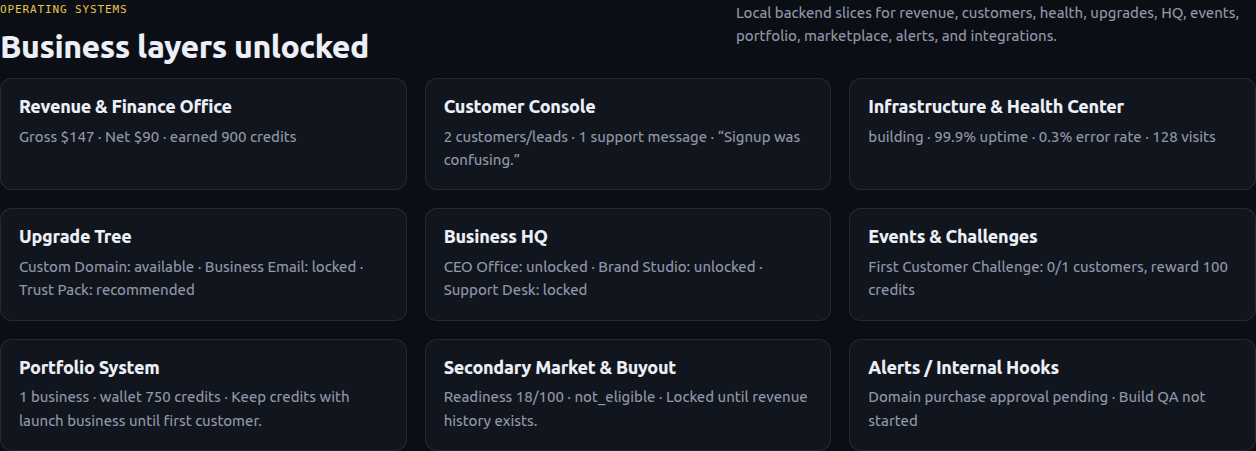
Mission Control starts focused — briefing, missions, treasury, brand, build. As the cabinet earns its first customers and first revenue, new departments unlock: a Customer Console, a Revenue & Finance Office, an Infrastructure & Health Center, an Upgrade Tree, and eventually the Portfolio System and Secondary Market for buyout or sale.
Business systems · unlocked layers Local backend slices
Business layers unlocked panel showing nine system cards: Revenue and Finance Office (gross $147, net $90, earned 900 credits), Customer Console (2 customers, 1 support message, 'Signup was confusing'), Infrastructure and Health Center (building, 99.9% uptime, 0.3% error rate, 128 visits), Upgrade Tree (Custom Domain available, Business Email locked, Trust Pack recommended), Business HQ (CEO Office unlocked, Brand Studio unlocked, Support Desk locked), Events and Challenges (First Customer Challenge 0 of 1 customers, reward 100 credits), Portfolio System (1 business, wallet 750 credits), Secondary Market and Buyout (readiness 18 of 100, not eligible until revenue history exists), and Alerts / Internal Hooks (Domain purchase approval pending, Build QA not started).
What it actually is

The arcade wrapper, the operating substrate.

Every plain-English surface in Mission Control maps to a real piece of the PermaShip operator platform — agents, ledgers, pipelines, and gated business modules. The arcade language is for you; the engine underneath is the same one running our own portfolio.

See the full surface-to-substrate mapping
Mission Control surfaceWhat's running underneath
Daily briefing from the Chief of StaffMulti-agent specialists (Nexus model) summarized into one operator brief.
"Open mission" on a queued actionA scoped objective with cost, reward, and a state-aware acceptance check.
Advisor recommendation cardA specialist agent reading your live metrics, drafting a proposal, and showing risk + confidence.
"Approve 120 credits — secure domain"A reserved credit hold, a registrar purchase, DNS setup, SSL provisioning, and a settled ledger row.
"Building core product" stageA PermaShip pipeline running plan → implement → checks → deploy, surfaced as plain English.
"Departments are talking"Engineering, Growth, FinOps, Customer Voice agents publishing structured opinions to the board.
"Business layers unlocked"Backend modules gated by business state — revenue, customers, traffic, history.

You bring the audience.
The staff is already at the office.

Every cabinet ships with Mission Control, an AI staff, and an advisor board. Reserve one and the seat is yours.

Full refund any time before your app goes live. Refund policy →